pages

Showing posts with label Asp.net MVC4. Show all posts

Thursday, 28 September 2017

Filter Attributes in MVC

An action filter is an attribute that can be applied to an Action or the controller.

Types of filters in MVC:

1.Authorization filters
2.Action filters
3.Result filters
4.Exception filters


Filters in MVC execute in the same order as mentioned above.

Authorization filters always execute before action filters and exception filters always execute at last.
The base class for all action filters is the FilterAttribute class which is in System.Web.Mvc namespace
The base class which is ActionFilterAttribute has the following methods which we can override:
· OnActionExecuting – This method is called before a controller action is executed.
· OnActionExecuted – This method is called after a controller action is executed.
· OnResultExecuting – This method is called before a controller action result is executed.
· OnResultExecuted – This method is called after a controller action result is executed.

Tuesday, 24 February 2015

Passing Exception to Controller from Global asax

Came across this scenario where we have to redirect for all un-handled exceptions to user diplaying the StackTrace, Exception message and other details.

Global.asax
protected void Application_Error(object sender, EventArgs e)
        {
            Exception exception = Server.GetLastError();
            Response.Clear();

            RouteData routeData = new RouteData();

            // Routing to ~/Error/Error
            routeData.Values.Add("controller", "Error");
            routeData.Values.Add("action", "Error");
            routeData.Values.Add("error", exception);

            // clear error on server, not to display yellow error screen
            Server.ClearError();

            IController home = new TWC.IssueTrak.Mobile.Controllers.HomeController();
            home.Execute(new RequestContext(new HttpContextWrapper(Context), routeData));
            
        }


ErrorController
 public ActionResult Error(Exception exception)
        {
            return View("~/Views/Shared/_Error.cshtml",Exception);
        }


Error.cshtml
@model System.Exception
<div>Exception Message: <b>@Model.Message</b></div>

Friday, 6 December 2013

Working with twitter bootstrap in Asp.Net MVC4

At time when i was struggling in my project for UI development my manager told me about this great thing. At start i found it little difficult to work with but later when i got to know about its huge benefits and swiftness i became a fan of it. I was like "Oh, we can make complete project out from it.".

What really twitter bootstrap is who made it and why, all these questions i will answer here only.
2 Designers from twitter (Mark Otto and Jacob Thornton) actually made it now its an open source project hosted on github.

For Asp.net MVC projects you directly have to install the 2 NuGet packages. They are:
  1. twitter.bootstrap.mvc4
  2. twitter.bootstrap.mvc4.htmlhelpers
Actually you have one more option of installing the samples that those guys have made. For that you have to install a separate package:  twitter.bootstrap.samples.mvc4

Once through with all this you can continue with creating Models, Controllers, Generating Views or Creating Views in your project. All the Views will use Bootstrap Layout for Textboxes, Checkboxes. But for buttons you have to apply the class seprately.
Following are some examples of controls with bootstrap styling.
For getting more out of the Bootstrap you seriously need to know about all the style elements which you can get a good understanding from the following link:

I hope that this article will help you in using Twitter bootstrap for MVC4.
For any queries write comment.

Distinct Keyword in LINQ

Few days back when I was trying to Filter my result set using Linq Distinct keyword I got into a situation. The keyword didn't worked for me, I was getting same result set with or without Linq.

I Goggled for the solution, But most of the solutions offered to user the Group By operator. which is as follows:

Take an entity that contains following fields:
id, Name.
public class MyDemo
{

public int id{get; set;};

public string Name {get; set;};

}
MyDemo ListData = new MyDemo
{
id=1, Name="Alpha";
id=2, Name="Beta";
id=1, Name="Alpha";
id=3, Name="Gamma";
}
MyDemo ListResult;


ListResult = (ListData.Select(t => t).GroupBy(x => x.Name).Select(y => y.First()).ToList()

Distinct Keyword is little tricky in Linq. At first it would not work same like Distinct in sql server Linq to Object behaves little weird because all are distinct object references so the other way round to this problem is use a GroupBy Operator.

We can get the solution to this problem by introducing an anonymous type to store the result and in that case we will get the desired result.

var result =  (from d in ListData select new { d.id, d.Name }).Distinct();

Thursday, 10 October 2013

Working with DropDownLists in Asp.net MVC


Drop down list in mvc is quiet different from drop down list control in web forms.

The reason being the Drop down list control in web form is so brilliant that whatever collection we give to it, it will take it quietly and do all the hard work from its side.

But in Asp.net MVC scenario is little different. Here Drop Down List Helper takes only List<SelectListItem>.

So This is a class added for storing drop down list values. It is under System.Web.Mvc namespace
It has 3 Properties: Name, Value, Selected.
Selected is bool and rest two are string type.

There are 2 types of data you can fill Dropdown list with:
1) InMemory collection.
2) From Database.

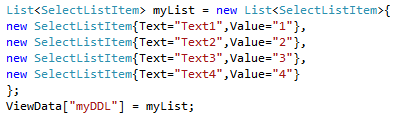
For InMemory Collection you have to create a list of 
List<SelectListItem>
either in View or in controller( later pass it to view).
This is how you can create it in controller.

Same can be done in View also. But Then passing data to view from Controller will not be true in that case as you are preparing the data in view itself.

From Database
While selecting the data from database you can directly convert the data to List of SelectListItem.

If you want you view to Generate Dropdownlist for you the you have create a propery with List<SelectListItem> in your Model.
public List<SelectListItem> MyDropDownList { get; set; }

But while submitting the page it will not give you SelectList Item. Instead Drop down list will return a simple string value just like Textbox.

I hope this is enough for start working with Drop down list.
For any queries comment below.

Monday, 22 July 2013

Working with PartialViews in MVC4

Hi, Its not been a long time for me to started working with asp.net MVC. What I saw is that lot of developers find it difficult to start with Partial views.
For those who are coming from the background of Web Form it is not at all difficult to compare it with Web User Controls. Just like we can display the User Control on any page we want by Registering the control, Same way we can use the Partial View in MVC.

Here in this post i will be following 2 steps, First will be creating Partial Views and Second will be calling that Partial View in View.

Lets start with the First step:

Creating a Partial View

Partial View can be created by following ways:

First: By Right clicking on Views folder in which you want to create the view.

After this step one PopUp will appear for asking you if you want to create the View as Strongly typed.
In that popup one checkbox will be there for Partial View.


OR
Second: By using Add New Item option

Note: Using this Second option you will not get the option for creating the view as partial view.


After this we will get a blank page and we can put any HTML content we want in Partial View.
I am displaying some RAW content.


Calling a Partial View

For calling a partial view you can use two methods.
         
          1. @Html.Partial(string Viewname)

This returns a string, means you can store the output of this into any variable also Or return it from function.

          2. Html.RenderPartial(string Viewname)
This internally returns Void. Result is written directly to Response stream during the execution.

Using in Razor and Aspx:

Razor Syntax:

@Html.Partial("view")
Html.RenderPartial("view");

Aspx Syntax:

<%: Html.Partial("ViewName") %>

<% Html.RenderPartial("ViewName"); %>


PS: Partial Views can also be created as Strong Views.